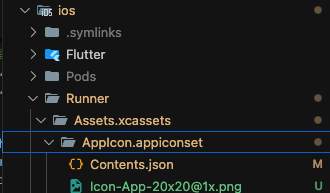
이렇게 경로에 맞춰 에셋들이랑 Contents.json 이 있는지 확인
Contents.json에는 아래와 같이 매핑된 내용이 들어가야 함 이렇게 에셋별로 쭉...
{
"images": [
{
"size": "20x20",
"idiom": "iphone",
"filename": "Icon-App-20x20@2x.png",
"scale": "2x"
},
{
"size": "20x20",
"idiom": "iphone",
"filename": "Icon-App-20x20@3x.png",
xcode > runner > general > App Icons and Launch Screen 확인
AppIcon으로 설정되어 있어야 함

'Application > Flutter' 카테고리의 다른 글
| [Flutter] 기기 인식 안될 때, Could not find Dart in your Flutter SDK ... (0) | 2025.07.22 |
|---|---|
| [Flutter] 앱, 스플래시 아이콘 (1) | 2025.07.12 |
| [Flutter] ios 카카오 로그인 안될 때 (2) | 2025.07.12 |
| [Flutter] App Push 배포하니까 안되는 경우 (0) | 2025.06.29 |
| [Flutter] 갑자기 ios 기기 인식이 안될 때... 무한 Preparing (0) | 2025.06.17 |

댓글