갑자기 프로젝트를 실행하니 아래와 같은 메시지가 나오며 SDK 인식을 못함(Cursor에서 문제였음..)
Could not find Dart in your Flutter SDK. Please run 'flutter doctor' in the terminal then reload the project once all issues are resolved.
flutter doctor도 잘되고... => flutter doctor
PATH도 정상이고.... => echo $PATH 를 통해 플러터 설치 경로 확인
IDE에서 인식을 못하는 문제라고 결론
조치할 수 있는 아래 방법들이 있음
#1. 설정, 캐시, 확장 전부 삭제
rm -rf ~/Library/Application\ Support/Cursor
rm -rf ~/Library/Preferences/dev.cursor
rm -rf ~/Library/Caches/dev.cursor
rm -rf ~/Library/Saved\ Application\ State/dev.cursor.savedState
rm -rf ~/.vscode/extensions/*cursor*
#2. settings > sdk 를 검색해서 경로를 직접 IDE에 설정
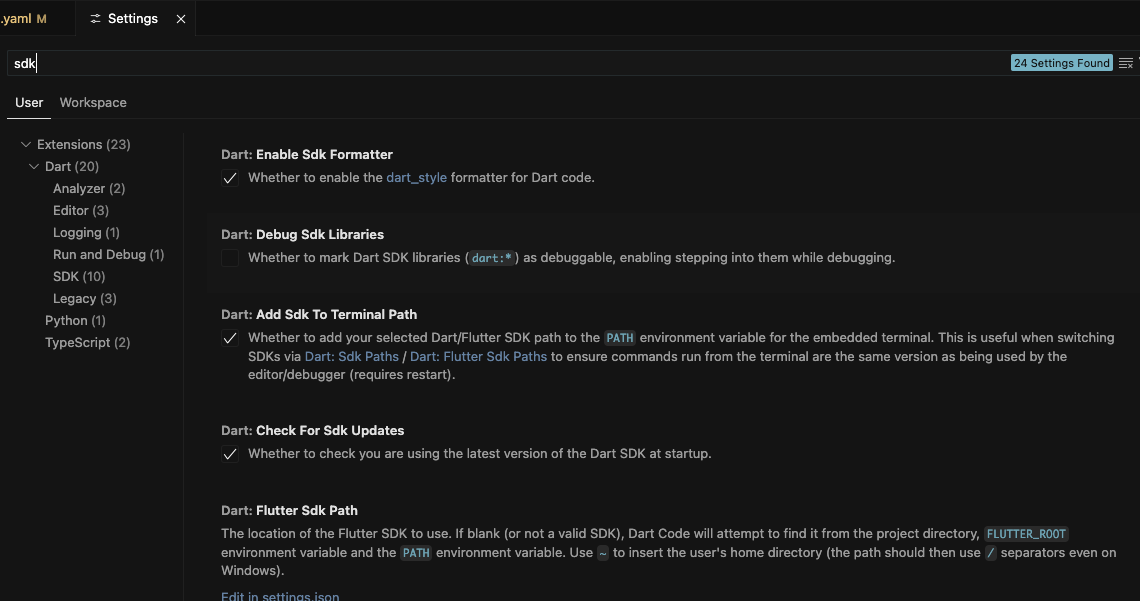
#2. Flutter 캐시를 재설정
flutter upgrade
flutter precache
flutter doctor
'Application > Flutter' 카테고리의 다른 글
| [Flutter] 앱, 스플래시 아이콘 (1) | 2025.07.12 |
|---|---|
| [Flutter] App icon 계속 오류가 발생할 때 (0) | 2025.07.12 |
| [Flutter] ios 카카오 로그인 안될 때 (2) | 2025.07.12 |
| [Flutter] App Push 배포하니까 안되는 경우 (0) | 2025.06.29 |
| [Flutter] 갑자기 ios 기기 인식이 안될 때... 무한 Preparing (0) | 2025.06.17 |

댓글